# 1. Registration and KYC
ℹ️ This module is available for all roles.
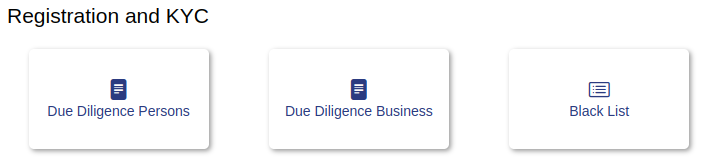
# 1.1- Due Diligence Persons
This module allows an audit of data and documents submitted by persons to verify that there are no substantial legal risks arising from their activity.
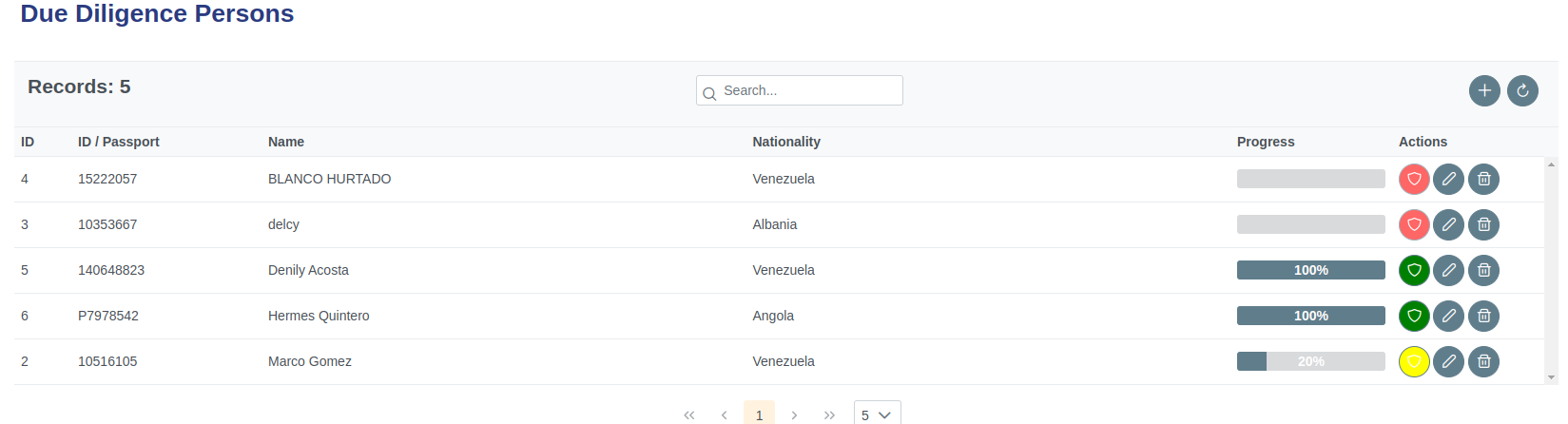
Clicking on modules presents the view that allows the administrator to manage system modules.
# 1.1.1- Components
| Icon | Label | Type | Description |
|---|---|---|---|
| ➖ | Records | Table | Show number of roles. |
| ➖ | ID | Table field | Show ID person. |
| ➖ | ID / Passport | Table field | Show ID person. |
| ➖ | Name | Table field | Show Name person. |
| ➖ | Country | Table field | Show Country person. |
| ➖ | Progress | Table field | Show progress bar. |
| ➖ | Actions | Table field | Show actions button. |
 | New Button | Command button | Creates a new role. |
 | Refresh Button | Command button | Refreshes the table. |
 | progress indicator | Indicator | KYC progress indicator. |
 | Green indicator | Indicator | KYC completed. |
 | Yellow indicator | Indicator | KYC in process. |
 | Red indicator | Indicator | KYC paused for verification. |
 | Edit Button | Command button | Edit form of people. |
 | Delete Button | Command button | Delete form of people. |
# 1.1.2- Components
# 1.1.3- Add Persons
| Icon | Label | Type | Description |
|---|---|---|---|
 | ➖ | Command button | Enlargewindow. |
 | ➖ | Command button | Close window. |
| ➖ | ID | String | Disable. |
| ➖ | Name | String | Disable. |
| ➖ | Icon | String | Incon module. |
| ➖ | Order | Number | Position of the module in view window. |
 | Status | Boolean button | Turn module on or off. |
| ➖ | English | String | Name of the module in English. |
| ➖ | Spanish | String | Name of the module in Spanish. |
 | Save | Command button | Save button. |
 | Refresh Button | Command button | Cancel button. |
# 1.1.2- Step by Step Add Persons
✅ 1. Clicking on page presents the view that allows the administrator to manage.
✅ 2. Clicking on page presents the view that allows the administrator to manage.
✅ 3. Clicking on page presents the view that allows the administrator to manage.
✅ 4. Clicking on page presents the view that allows the administrator to manage.
✅ 5. Clicking on page presents the view that allows the administrator to manage.
✅ 6. In case you do not want use this module click on the icon identified as HOME at the top right of the page to return to the main screen of the system.
# 1.2- Due Diligence Business
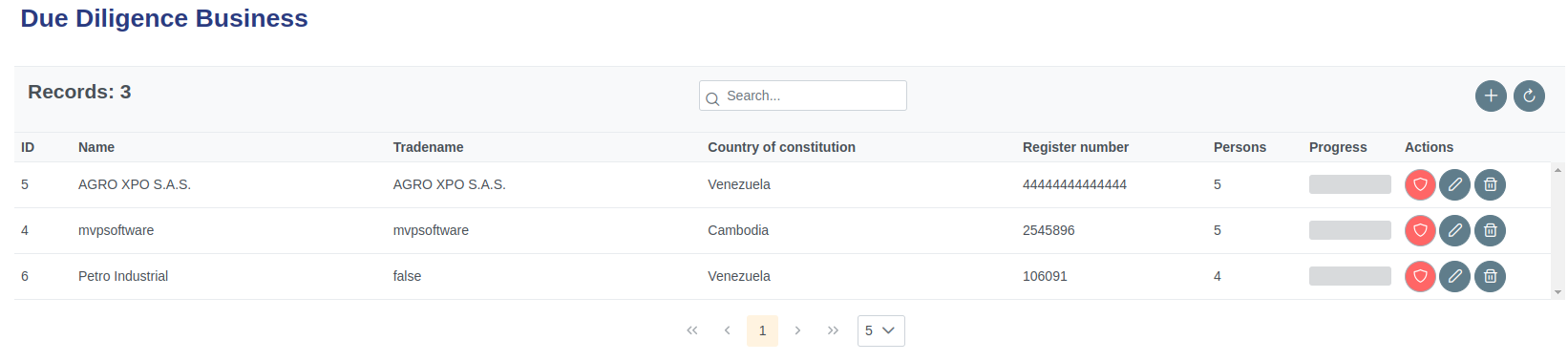
This module allows an audit of data and documents submitted by companies to verify that there are no substantial legal risks arising from their activity.
# 1.2.1- Components
| Icon | Label | Type | Description |
|---|---|---|---|
| ➖ | Records | Table | Show number of roles. |
| ➖ | ID | Table field | Show ID person. |
| ➖ | ID / Passport | Table field | Show ID person. |
| ➖ | Name | Table field | Show Name person. |
| ➖ | Country | Table field | Show Country person. |
| ➖ | Progress | Table field | Show progress bar. |
| ➖ | Actions | Table field | Show actions button. |
| New Button | Command button | Creates a new role. |
| Refresh Button | Command button | Refreshes the table. |
| progress indicator | Indicator | KYC progress indicator. |
| Green indicator | Indicator | KYC completed. |
| Yellow indicator | Indicator | KYC in process. |
| Red indicator | Indicator | KYC paused for verification. |
| Edit Button | Command button | Edit form of people. |
| Delete Button | Command button | Delete form of people. |
# 1.2.2- Components
# 1.2.3- Add Persons
| Icon | Label | Type | Description |
|---|---|---|---|
| ➖ | Command button | Enlargewindow. |
| ➖ | Command button | Close window. |
| ➖ | ID | String | Disable. |
| ➖ | Name | String | Disable. |
| ➖ | Icon | String | Incon module. |
| ➖ | Order | Number | Position of the module in view window. |
| Status | Boolean button | Turn module on or off. |
| ➖ | English | String | Name of the module in English. |
| ➖ | Spanish | String | Name of the module in Spanish. |
| Save | Command button | Save button. |
| Refresh Button | Command button | Cancel button. |
# 1.2.4- Step by Step Add Business
✅ 1. Clicking on page presents the view that allows the administrator to manage.
✅ 2. Clicking on page presents the view that allows the administrator to manage.
✅ 3. Clicking on page presents the view that allows the administrator to manage.
✅ 4. Clicking on page presents the view that allows the administrator to manage.
✅ 5. Clicking on page presents the view that allows the administrator to manage.
✅ 6. In case you do not want use this module click on the icon identified as HOME at the top right of the page to return to the main screen of the system.
# 1.3- Black List
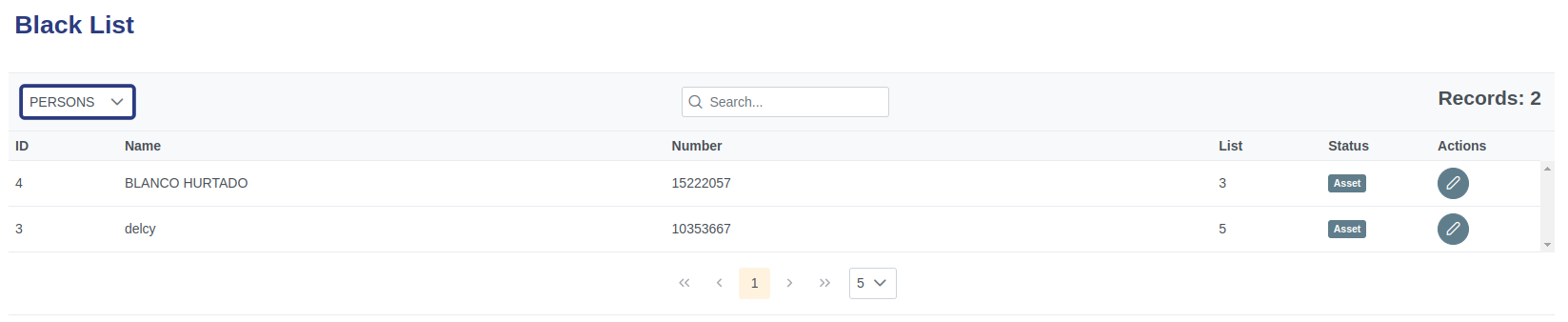
Module presenting the list of verified persons and companies that were found in the sanctions lists of the different organisms.
# 1.3.1- Components
| Icon | Label | Type | Description |
|---|---|---|---|
| ➖ | Records | Table | Show list person/business. |
| ➖ | ID | Table field | Show ID person/business. |
| ➖ | Name | Table field | Show Name person/business. |
| ➖ | Number | Table field | Show NUmber person/business. |
| ➖ | List | Table field | Show # list person/business. |
| ➖ | Status | Table field | Show command button upload. |
| ➖ | Actions | Table field | Show actions button. |
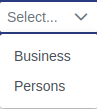 | selection list | List | Selection list person/business. |
 | Search element | Command | Search person/business. |
 | Status indicator | Indicator | Status person/business. |
| Edit Button | Command button | Edit form of person/business. |
# 1.3.2- Step by Step Edit Status person/business
✅ 1. Click the edit button to display the status edit form.
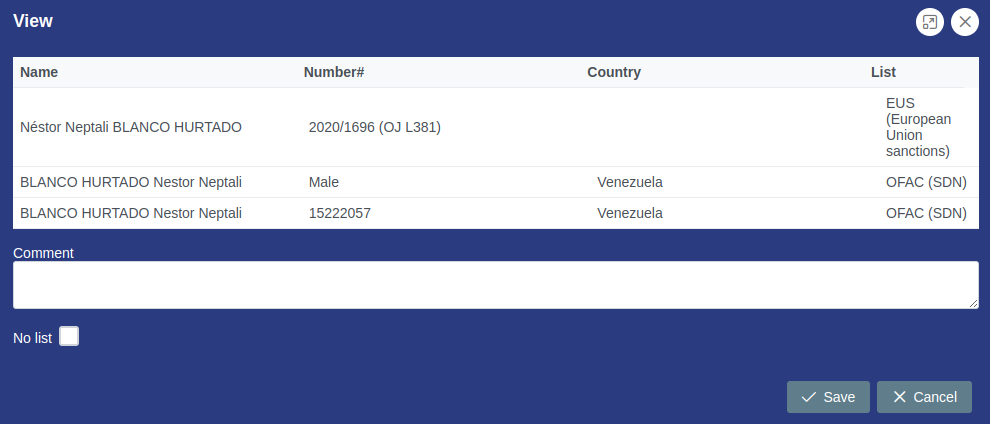
✅ 2. Edit the observation fields in case you apply and check the field not to list, to pause that blacklisted person or company.
✅ 3. Proceed to save or cancel changes as appropriate.
✅ 4. Check the change of status of the person or business on the list.